Harper Ebook and Workbook Template: A Designer's Review
More Than Just a Pretty PDF
If you've ever stared at a blank page, willing an ebook or workbook into existence, you know the struggle. The vision is there, but the execution feels monumental. That's where a resource like the Harper Ebook and Workbook Template comes in. It's not just a collection of pre-made pages; it's a structured foundation designed to save you dozens of hours while ensuring your final product looks polished and professional. Think of it as a design co-pilot for your next digital product, lead magnet, or client workbook.
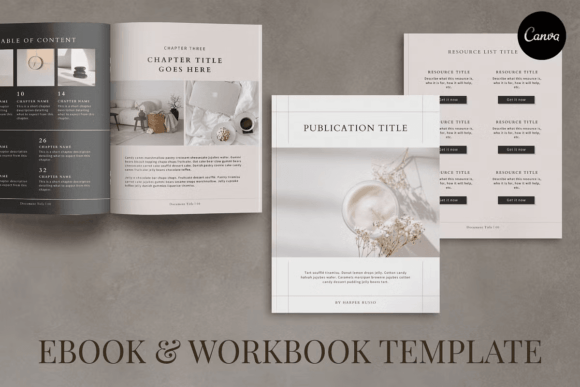
What immediately stands out about the Harper template is its balanced personality. It feels modern and clean without being sterile. The visual style leans into elegant simplicity, using thoughtful whitespace, a curated color palette, and subtle design elements that guide the eye without overwhelming the content. This isn't a template that shouts for attention with flashy graphics. Instead, it whispers confidence, allowing your words, images, and ideas to take center stage. It’s the kind of design that builds trust with your audience from the first page turn.
Where This Template Truly Shines
The real power of the Harper Ebook and Workbook Template lies in its versatility across projects. For the entrepreneur or small business owner, it's perfect for creating a comprehensive brand style guide, a detailed service menu, or an onboarding workbook for new clients. The included service and pricing sheets provide a clear, professional framework to present your offerings, while the case study page offers a structured way to showcase your successes.
For bloggers, content creators, and publishers, the template is a game-changer. Imagine transforming a popular blog series into a beautifully formatted ebook. The 11 content page templates offer enough variety to keep long-form content engaging, and the gallery pages are ideal for visual storytelling or recipe roundups. The chapter introduction pages help break up your material into digestible sections, improving the reader's journey. It’s a fantastic tool for repurposing your best work into a high-value asset.
Designers and marketers will appreciate the template as a starting point for client projects. Instead of building from scratch, you can use Harper's structure to quickly mock up a proposal for a lead magnet or a digital magazine. The consistent visual hierarchy built into the pages—from headings to pull quotes to body text—teaches good editorial design principles. It’s also an excellent resource for crafters and hobbyists looking to create a digital pattern book, a workshop manual, or a portfolio of their work.
Practical Guidance for Using Harper
Getting the most out of this template means thinking like a designer, even if you aren't one. First, evaluate the project fit. The Harper style is best suited for brands and content that value clarity, sophistication, and a touch of minimalism. If your brand identity is loud, playful, and maximalist, you might need to customize it heavily. But for a modern typography feel that appeals to a broad audience, it's an excellent match.
Next, embrace the customization. The fact that it's fully customizable in Canva is its biggest strength. Don't just swap out the placeholder text. Change the fonts to match your existing brand typeface. Adjust the colors to your exact brand palette. Replace the images with your own high-quality photography or graphics. The goal is to make the template an invisible scaffold, not a recognizable stamp. Pay special attention to the font pairing—if you change the heading font, ensure the new one still creates a clear contrast and visual hierarchy with the body font.
Consider the included pages as a menu, not a mandate. You have 4 cover pages to choose from—pick the one that best sets the tone. Not every project needs a testimonial page or a resource page. Be selective and delete what you don't need. This keeps your final ebook focused and lean. Always do a final review for readability. Check your line spacing, paragraph length, and color contrast, especially if you're changing the background or text colors from the original design.
Finally, think about the end format. The template is provided in US Letter and A4 size, which are perfect for printables or PDFs viewed on larger screens. If you're creating a document primarily for mobile reading, you might consider slightly increasing your body font size during customization. The Harper Ebook and Workbook Template provides a robust, professional starting point. Its value isn't in doing the work for you, but in giving you the design assets and structure to do your best work, faster, and with more consistent results.